 Family Tree Maker 2011
I just received my copy of
FTM 2011 and there are a lot of changes and improvements to the program. I’m not sure I have found them all yet.
Here is a review of the changes and improvements I found in the new FTM 2011:
Smart Stories
The new
Smart Stories is a narrative tool that helps write family stories. Choose from the facts, sources, and notes you’ve already entered in your tree and then drag-and-drop them into your report. The Smart Stories put these Facts into narrative form. The Smart Stories are then completely editable. Smart story text is linked dynamically to your FTM2011 database file, so if a fact changes, the information in your story will be updated automatically. It’s an easy way to get started writing a story for any person in your family. The Smart Story narrative report is found under
Publish, Other.
Charts
Fan Charts
There are five different shapes when creating a fan chart: full circle, semi-circle, quarter-circle, etc. These can be found under
Publish, Charts.
Bow Tie Chart
Bow Tie Charts show both maternal and paternal ancestors of one person in one chart. Maternal ancestors are on left and paternal on the right. Siblings can now be included in the Bow Tie Chart. Found under
Publish, Charts.
 Last Generation Shown Vertically
In descendant and hourglass charts, the last generation in the chart can be displayed vertically.
Pedigree Chart
The book layout for the pedigree chart makes better use of space.
Photos and Embellishments
You can add images to a chart and drag and drop them wherever you like. In addition, Family Tree Maker comes with a set of embellishments, borders, and backgrounds that you can use to decorate charts and reports.
Fonts in Charts
Font size, type, and color can be changed based on fact types. This makes the reports more readable, and makes the important things stand out.
Reports
TimeLine Report
In the new timeline report, you can view the events that occurred during your ancestors’ lives. Choose one person – then choose family events, historical events, or even private facts to add to his timeline. You can edit, delete or add your own historical events. The historical events included with FTM 2011 are world historical events but the program tries to choose relevant historical events. I think it will make sense toalso add my own historical facts that I know actually would have affected each ancestor. Found under
Publish, Person Reports.
Surname Report
The new Surname Report lists the surnames in your tree, including the total number of individuals with that surname, the number of males and females with that surname, etc. Found under
Publish, Person Reports.
New Descendant Reports
Family Tree Maker gives you four descendant report numbering systems: Register, NGSQ, Henry, and d'Aboville. The register and simple register reports are now simplified into one descendant report that included all of the options from both. Found under
Publish, Genealogy Reports.
Custom Report
The custom report now has user-selected primary and secondary sorts. In addition, new options allow you to include age at death, number of children, age at first marriage, and more. Found under
Publish, Person Reports.
Kinship Report
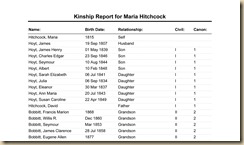
You can now sort the Kinship Report by relationship (for example, first cousins can be grouped together). This looks to me to be much more like the well-regarded Kinship report from FTM 16
.
 Save Report Settings
You can save the current report settings and use them as the preferred settings for that report.
Bibliography
You can create a simple bibliography of source titles or an annotated bibliography that includes summary information, such as repository and reference notes.
Report Headers and Footers
You can define the headers and footers for a report.
Photo Albums
You can now create an album for a person, relationship, or both. Very nice.
Calendar
You now have the option to display death dates in the calendar.
Ancestry Integration
Expanded Web Dashboard
The expanded Web Dashboard now includes Member Connect activity, links to message boards, and notification of new Ancestry messages. I immediately found someone who saved the census of my great-grandparents to their tree.
Enhanced Performance
Uploading and downloading speeds have been improved. In addition, Family Tree Maker says they have increased ability to upload large files to Ancestry.com. I don't have a large file so this is something I cannot check out.
Internet Speed
You can choose the type of Internet connection you're using. Then Family Tree Maker uses this information to tailor how it downloads information from the Web.
Media Management
Locate Missing Files
If you've moved your media items and Family Tree Maker has marked them as "missing," the Find Missing Media tool can locate them all at once. Very handy after moving to a new computer. Go to the Media workspace, then click on
Media, Find Missing Media.
Categories
You can now assign categories to multiple items at one time. This was a helpful addition. I had just categorized my media one by one. Phew.
Media Metadata Stored in Family Tree Maker
If your images contain metadata, the information will be stored. If the metadata contains a caption, date, or description, this information will be automatically entered for you.
Data Entry
Automatic Reference Numbers
Family Tree Maker can assign reference numbers automatically to individuals, relationships, or both. If you upgrade from an older version of Family Tree Maker with reference numbers, your numbers will remain the same in Family Tree Maker 2011.
Enhanced Foreign Characters Usage
Additional foreign language symbols and characters have been added.
Duplicate Person Alert
When you enter new individuals, Family Tree Maker analyzes the information and alerts you if it believes you may already have the individual in your tree. Haven't run into this problem but it sounds like it can keep a database from getting messed up.
Description Fastfields
You can now use the Fastfields feature for Description fields. Welcome back, fastfields.
General
Updated Interface
This is the first thing you will notice when you open FTM 2011. There is a new Ancestry color theme.
Enhanced Index of Individuals
The Index of Individuals on the Family tab will now sort people based on name and then birth date.
Historical Timelines
Family Tree Maker comes with a set of default historical events that are used in timelines. Now you can edit, delete, and add to these historical events. In addition, Family Tree Maker looks at facts entered for an individual and displays the most location-appropriate historical events. You can manage historical facts in the edit tab.
First-Time User Assistance
The first time you open Family Tree Maker, it will automatically search for Family Tree Maker (.ftw) files on your computer (Version 16 and earlier).
Place Enhancements
If many locations in your tree are from the same country, you can choose this as your "home" country. That way, Family Tree Maker will not display this country in fields, and charts and reports. I’m happy to see this improvement. It’s just a little thing but seeing USA over and over in the reports looked redundant.
Companion Guide
If you have any questions about how to do something in FTM 2011, you will probably find the answer in the 349 page Companion Guide. This pdf Companion Guide which opens on your computer is searchable and can be accessed from Help, Companion Guide.
I have a new laptop that is running 64 bit Windows 7 and the program installed easily. Be sure to backup your FTM 2010 file since the FTM 2011 file cannot be read by FTM 2010. FTM 2011 install in a new folder and does not install over FTM 2010. Ancestry.com sent me this copy of FTM 2011, but FTM has been my program of choice since the mid-90’s. I’ve tried most of the other programs but always come back to FTM. I love the integration with Ancestry.com which makes my searching for info on my ancestors very easy. I also like the flexibility of the user interface.
When you register FTM 2011, be sure to enter “login to your account” and not “create a new account” if you are already a member of Ancestry.com. I accidently choose the wrong choice, and I could not register FTM. I got a message that said “unknown error” A call to tech support at 1-800-ancestry set me straight. Thanks!
You can still enter the coupon G5JXTRY at checkout in the box marked Redeem Coupons for a 20% discount.


